
JOT AI Plugin: How Automation Is Transforming Work in Revit, AutoCAD, and Civil 3D
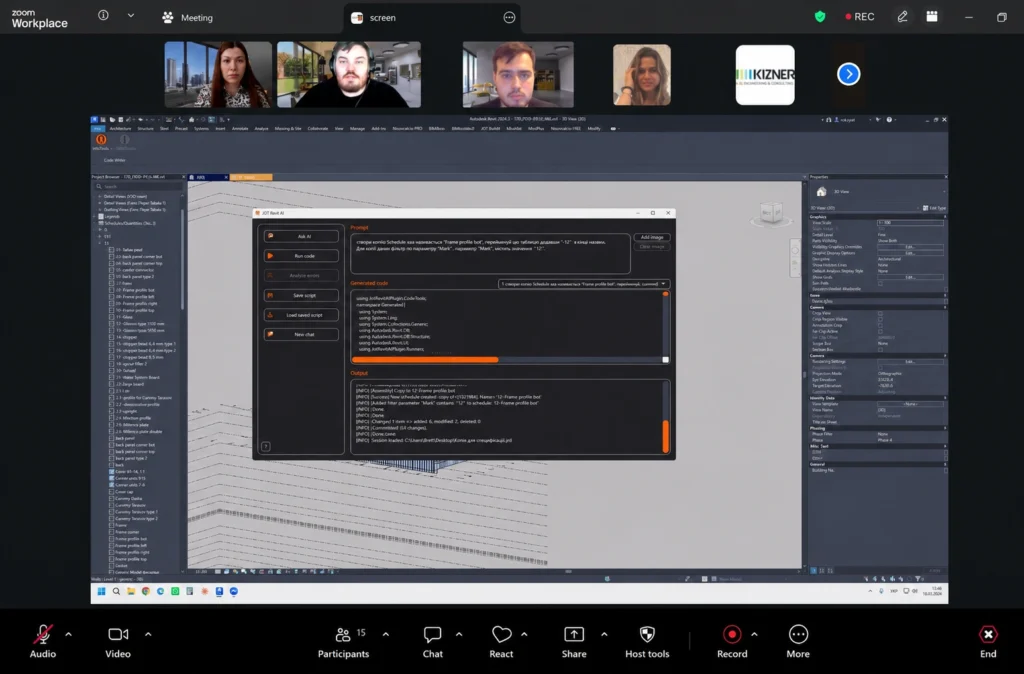
On June 18, the JOT Solutions team hosted a hands-on workshop dedicated to working with the JOT AI plugin for Revit, AutoCAD, and Civil 3D.
The event brought together engineers, architects, BIM/Revit/GIS specialists, CAD professionals, technical students, and anyone looking to work faster, more accurately, and more efficiently.
During the workshop, participants saw how a simple text prompt can be transformed into a ready-to-use solution for automating daily tasks. We also shared ready-made prompts, practical tips, and guidelines on how to formulate effective AI requests.
The session was highly productive: participants asked numerous practical questions, shared their own challenges, and actively explored how JOT AI can help automate routine processes in real-world projects.
What Is the JOT AI Plugin?
The JOT AI plugin is a tool developed by the JOT Solutions team to automate workflows in Revit, AutoCAD, and Civil 3D.
Its core concept is simple: users describe a task in plain language, and the plugin helps generate a solution to perform that task within their working environment.
This is especially useful for professionals who regularly deal with repetitive actions such as annotations, schedules, model elements, parameters, drawings, and technical documentation.
JOT AI does not replace engineers or BIM specialists. Instead, it helps reduce routine work and frees up more time for higher-value activities such as analysis, quality control, coordination, and technical decision-making.
What Was Demonstrated During the Workshop
During the event, the JOT Solutions team showcased practical use cases of JOT AI in Revit, AutoCAD, and Civil 3D.
Annotation Automation in AutoCAD
One of the examples focused on working with annotations in AutoCAD. This is a task that often consumes a significant amount of time, especially when repetitive actions must be performed across multiple drawings.
JOT AI helps users view these processes as tasks that can be automated, simplified, and managed more effectively.
Revit Plugin Generation
Participants also saw how JOT AI can assist in creating more advanced solutions for Revit, including custom plugins with user interfaces, demonstrated through a piping workflow example.
This is particularly relevant for MEP professionals, as working with piping systems, parameters, schedules, and system configurations often requires both precision and repetitive actions.
Schedule Automation
Special attention was given to schedule automation. In Revit, schedules are a critical component of project documentation, directly affecting both documentation quality and the efficiency of information exchange throughout a project.
Automating these processes helps save time and reduce the risk of manual errors.
Why Prompt Quality Matters
During the workshop, participants received not only the installation package but also valuable supporting materials, including ready-to-use prompts, practical tips, and guidelines for writing effective AI requests.
This is important because the quality of the output directly depends on how clearly the task is described.
A good prompt should explain:
- what needs to be done;
- what result is expected;
- what conditions, parameters, or constraints should be considered.
The more precise the prompt, the easier it is to obtain a useful solution for a real-world task.
Who Can Benefit from JOT AI?
The JOT AI plugin can be valuable for:
- Engineers;
- Architects;
- BIM/Revit specialists;
- GIS and Civil 3D specialists;
- CAD professionals;
- Junior candidates;
- Students in technical disciplines.
For experienced professionals, it offers an opportunity to optimize workflows and reduce time spent on repetitive tasks. For junior specialists and students, it provides a practical introduction to how modern AI tools can be applied within the AEC industry.
Why You Should Try JOT AI
Automation has become an essential part of engineering, architecture, and BIM workflows. Teams work with large models, drawings, technical documentation, and international projects where speed and accuracy are critical.
JOT AI helps users take their first step toward automation without requiring extensive programming knowledge. You describe the task, and the plugin helps you find a faster solution for working in Revit, AutoCAD, or Civil 3D.
The plugin is worth testing if you:
- frequently perform repetitive tasks;
- want to reduce time spent on routine work;
- work with Revit, AutoCAD, or Civil 3D;
- are interested in AI tools for engineering workflows;
- want to make your workflow more efficient.
How to Install the JOT AI Plugin
You can try JOT AI by following the installation instructions available on the JOT Solutions website.
JOT AI for Revit
https://jot-solutions.com/jot-revit-ai
JOT AI for AutoCAD / Civil 3D
https://jot-solutions.com/jot-autocad-civil-ai/
Before installation, we recommend reviewing the instructions and verifying compatibility with your software version. JOT AI supports Revit and AutoCAD versions from 2022 through 2026.
FAQ
The JOT AI plugin is a tool for automating tasks in Revit, AutoCAD, and Civil 3D using natural language prompts.
No. The core idea behind JOT AI is to allow users to describe tasks in plain language. However, the more precise the prompt, the better the results.
The plugin is designed for Revit, AutoCAD, and Civil 3D.
Engineers, architects, BIM/Revit/GIS specialists, CAD professionals, students, and junior candidates looking to work more efficiently.
Installation instructions are available on the JOT Solutions website:
https://jot-solutions.com/
If you want to grow your career in BIM, Revit, AutoCAD, Civil 3D, or GIS, explore the opportunities available at join-jot.com. You can browse current job openings, submit your CV, apply for internships, or discover courses designed to strengthen your technical skills and prepare you for work on international projects.