
MEP Design in Revit: What It Is and How to Get Started
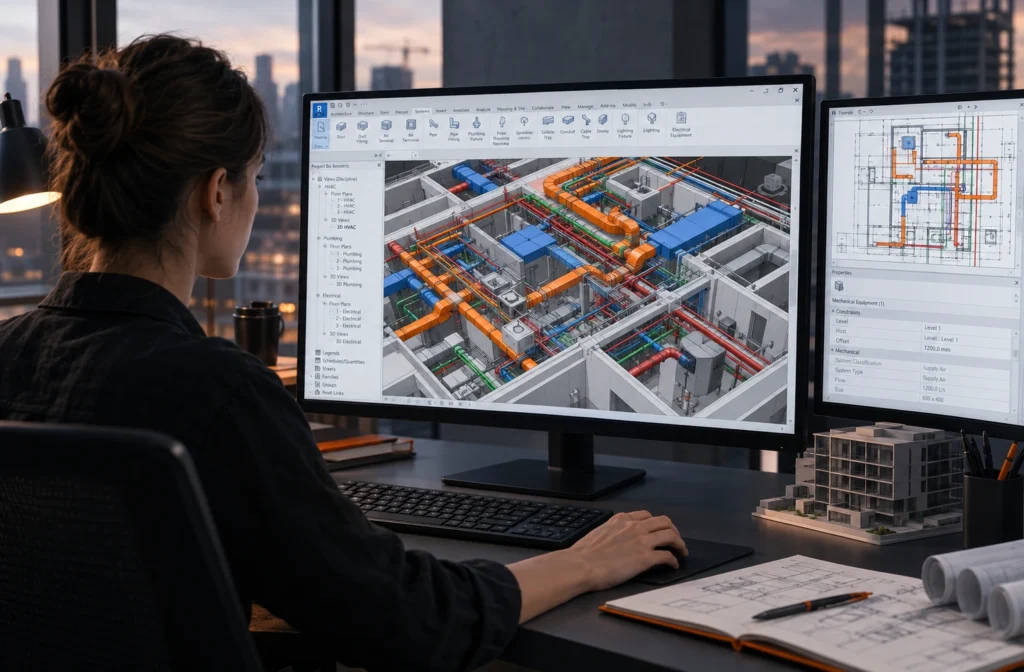
A building without engineering systems is just a concrete shell. Ventilation, heating, water supply, drainage, and electricity make it suitable for living and working. MEP design brings these systems together. People rarely discuss this field as much as architecture, yet every building project depends on it.
MEP offers a practical entry point into the AEC industry for engineers, technical students, and people looking to change careers. Demand for skilled professionals remains steady, and MEP tasks follow well-defined workflows. Most work takes place in Revit, which also makes remote work possible. Let’s explore what MEP design involves, how it works in a BIM model, and how to take your first steps.
What Is MEP Design?
MEP stands for Mechanical, Electrical, and Plumbing. In practice, the term covers three groups of building systems:
- Mechanical (HVAC) — heating, ventilation, and air conditioning. These systems include air ducts, ventilation units, radiators, fan coil units, and cooling equipment.
- Electrical — power distribution, lighting, low-voltage systems, cable trays, and electrical panels.
- Plumbing — water supply, drainage, stormwater systems, and, in some cases, fire suppression.
An MEP engineer must fit these systems into a building so they work efficiently and meet applicable standards. They must also avoid conflicts with other systems, structural elements, and the architectural design. This sounds simple, but the work often requires compromise. Ducts need enough clearance, beams need adequate depth, and architects want high ceilings.
Why Do Engineers Design MEP Systems in BIM?
Building services occupy some of the most crowded spaces in a building. The area above a suspended ceiling may contain air ducts, heating pipes, drainage stacks, cable trays, and sprinkler systems. A 2D drawing can easily hide a pipe that passes through a beam or a duct that does not fit above a doorway. Teams often discover these problems during construction, when fixing them costs the most.
A BIM model helps prevent these issues. All systems share the same 3D space with the architectural and structural models. Engineers can identify clashes during design instead of waiting until installation. This is one of the main reasons companies adopt BIM for MEP coordination.
What Does MEP Design Look Like in Revit?
Autodesk once offered a separate product called Revit MEP. However, Revit now includes the tools engineers need to design building systems. Today, people often use the term “Revit MEP” to describe MEP design work in Revit.
Here are the key concepts every MEP specialist should understand.
Systems
In Revit, ducts, pipes, and equipment connect to form systems. Examples include supply air, exhaust air, domestic hot water, and sanitary drainage systems. Revit tracks the elements within each system. Engineers can check system connectivity, create schedules, and assign colors to systems in drawings.
Equipment Families
Ventilation units, grilles, radiators, plumbing fixtures, and light fixtures are examples of Revit families. Each family can contain parameters such as dimensions, airflow, power, and connection types.
A well-organized family library speeds up work considerably. That is why employers also value the ability to create and configure custom families.
Connectors
A connector defines the point where equipment joins a system. Revit uses connectors to understand that a duct connects to an air grille or a pipe connects to a radiator. Incorrect connector settings often cause disconnected systems in a model.
Calculations and Sizing
Revit can help engineers size ducts and pipes based on flow rates and review basic system parameters. However, engineers often perform advanced calculations in specialized software and use Revit to build the model and prepare documentation.
It is important to understand both sides of the process. The model must reflect engineering solutions that calculations support.
Documentation
Engineers use the model to produce system plans, sections, isometric diagrams, and equipment and material schedules. When the model changes, the drawings update accordingly. This reduces the need to transfer every revision manually.
MEP Coordination: Where the Biggest Value Lies
MEP coordination is a separate and highly востребован field. A coordinator combines models from different disciplines and checks them for clashes, using tools such as Navisworks or Revit’s built-in features. The coordinator then organizes discussions and tracks each issue until the team resolves it.
This role requires technical knowledge and strong communication skills. You may need to explain to an HVAC engineer why a duct must move lower or show a structural engineer why a beam needs an opening.
If you enjoy seeing the bigger picture and working with different specialists, MEP coordination may be a good career path for you.
What Skills Does an MEP Engineer Need?
Technical knowledge:
- An understanding of how building systems work, including airflow, hydraulics, heat transfer, and the basics of electrical distribution.
- Knowledge of the design standards that apply to your target market.
- The ability to read architectural and structural drawings.
Tools:
- Revit for system modeling, family management, and schedules.
- AutoCAD, since many projects and reference drawings still arrive in DWG format.
- Navisworks or other clash detection tools for coordination.
Professional skills:
- Attention to detail. One incorrect elevation can disrupt an entire system.
- The ability to handle revisions. MEP engineers often need to adjust their designs when architectural or structural plans change.
- Technical English for international projects where teams communicate and prepare documentation in English.
How to Start an MEP Career Without Experience
1. Choose one system to start with. Do not try to learn everything at once. Start with ventilation or water supply and drainage. These systems have clear workflows and are easier to approach step by step.
2. Learn the Revit basics. Levels, grids, views, linked models, and reference drawings provide the foundation for MEP work. Without these skills, you cannot use the MEP tools effectively. If you are moving from 2D drafting, read our guide on how to transition from AutoCAD to Revit.
3. Model a small project from start to finish. Choose an apartment or a small office. Model its ventilation or plumbing system, from the equipment to the final schedule. This project can become the first entry in your portfolio.
4. Take a structured course. You can learn the interface on your own, but a mentor and practical exercises can help you understand systems, connectors, and proper templates more quickly.
5. Apply for internships or junior positions. MEP employers often consider candidates with solid technical foundations and a willingness to learn. Working on real projects is one of the fastest ways to gain practical experience.
Frequently Asked Questions About MEP Design
MEP stands for Mechanical, Electrical, and Plumbing. It covers heating, ventilation, air conditioning, electrical systems, and plumbing. Together, these systems form a building’s engineering infrastructure.
Autodesk once offered Revit MEP as a separate product. Today, MEP tools are part of Revit. You need the standard Revit software and an understanding of its engineering features.
An MEP engineer designs systems within a specific discipline. An MEP coordinator combines models from different disciplines, identifies clashes, and organizes their resolution.
Yes. Engineers can model systems, prepare documentation, and coordinate projects using Revit and cloud-based environments. Many positions offer remote work, especially on international projects.
It depends on your background. An engineer with a relevant degree may need only a few months of Revit practice to qualify for a junior position. People without a technical background usually need more time because they must also learn the physical principles behind building systems.
Many beginners start with ventilation or water supply and drainage. These systems have clear workflows and provide a good introduction to how Revit systems and connectors work.
Want to start your career in MEP design? Explore our Revit: HVAC & Plumbing course or browse current MEP engineering vacancies on join-jot.com. You can apply by submitting your CV.